Documentation
Get from zero to managing prod databases in 10 minutes.
DBHelm runs entirely on your laptop, so most setup is "open the app and click a thing." These docs cover the bits where you might want a roadmap.
Getting started
- Day 1 checklist Register → discover → Studio → optional Pro or Platform key. Free vs Pro vs Platform at a glance.
- Install DBHelm Sign in, then download for macOS, Windows, or Linux.
- First launch & first account Pick any email + a strong password to bootstrap the super-admin.
- Import a kubeconfig Cmd+K, point at your local config, done.
- Add your first Direct Connection Postgres, MySQL, Mongo, and 50+ more — without K8s.
MongoDB — monitor & Studio (free)
- Connect your Mongo (all flavors) Direct Connection or a registered K8s environment — PSMDB, Community, StatefulSet, VM replica sets.
- What you get on the free tier Live dashboards, Query Insights, Topology, and read-only Studio with guarded writes. Advisors unlock with Pro.
- Known limitations & per-flavor notes Profiler for Query Insights, OS recs, curated execute-mql, SSH-tunnel caveats.
Cloud / SaaS adapters
- BigQuery Service-account auth, dry-run cost, INFORMATION_SCHEMA monitoring.
- Snowflake (beta) Username/password or key-pair auth, EXPLAIN dry-run, ACCOUNT_USAGE monitoring.
- Redshift (beta) IAM keys or Secrets Manager, Data API, CloudWatch monitoring.
- Databricks (beta) PAT auth, EXPLAIN COST, system.billing.usage monitoring.
Provisioning — on Kubernetes
- Create wizard Spin up a fresh cluster on a registered K8s env or in the cloud.
- Operator Hub (10) One-click install for CNPG, Percona PG, PSMDB, MongoDB Community Operator, MySQL Operator (Oracle), Redis Operator (Spotahome), K8ssandra (Cassandra), Strimzi (Kafka), Oracle Database Operator, IBM Db2u Operator. SSRF-safe manifest fetch; cluster-scoped resources require ack.
- MongoDB (Percona) PerconaServerMongoDB CR (PSMDB) — full Day 0 + Day 2 + backups.
- MongoDB (Community) MongoDBCommunity CR via the official MongoDB Inc. operator.
- MySQL (Oracle Operator) InnoDB Cluster CR — Group Replication + MySQL Router for read/write splitting.
- Redis (Spotahome Operator) RedisFailover CR — Redis + Sentinel for automatic failover.
- Cassandra (K8ssandra) K8ssandraCluster CR — multi-DC Cassandra with optional Reaper repairs.
- SQL Server (StatefulSet) Operator-free SQL Server on K8s — what Microsoft's docs now recommend.
- PostgreSQL (CNPG) CloudNativePG single-CRD operator.
- PostgreSQL (Percona Operator) Percona PG v2 with pgBouncer + pgBackRest.
- Apache Kafka (Strimzi) KRaft-mode Kafka via the Strimzi operator.
Provisioning — managed cloud
Backups & DR (per provisioned cluster)
- How backups work Adapter dispatch model + lifecycle.
- CNPG Backup postgresql.cnpg.io/v1/Backup CR.
- PSMDB Backup psmdb.percona.com/PerconaServerMongoDBBackup with PITR via oplog tracker.
- Percona PG (pgBackRest) PerconaPGBackup CR with full / diff / incr.
- MySQL Operator mysql.oracle.com/MySQLBackup — logical dump via util.dumpInstance.
- AWS RDS snapshot rds:CreateDBSnapshot API.
- Strimzi MirrorMaker2 Continuous async replication for DR.
- Restore CNPG bootstrap.recovery, PSMDB PerconaServerMongoDBRestore, RDS RestoreDBInstanceFromDBSnapshot.
- Schedules CNPG ScheduledBackup, PSMDB spec.backup.tasks[], Percona PG patch, RDS backup window.
In-cluster objects
- Postgres CREATE DATABASE / ROLE / SCHEMA — CNPG, Percona PG, RDS, Cloud SQL, Azure DB.
- MongoDB database / collection / user — PSMDB + MongoDB Community Operator clusters.
- MySQL CREATE DATABASE + CREATE USER + GRANT — RDS MySQL, Cloud SQL MySQL, Azure DB MySQL, MySQL Operator (k8s).
- Kafka topics KafkaTopic CR — partitions, replicas, cleanup.policy, retention.
- Snowflake WAREHOUSE / DATABASE / SCHEMA / ROLE / USER via DDL through the Snowflake Direct Connection.
- Databricks Unity-Catalog CATALOG + SCHEMA via DDL; SQL Warehouse via REST API.
- DDL safety Identifier quoting, reserved-word rejection, ASCII-only names.
Spot-check (integration smoke tests)
Intelligence & extensibility
- AI assistant Bring-your-own-key LLM. Every proposal pre-flighted through our destructive-op classifier + cost dry-run.
- Plugin SDK @dbhelm/sdk lets the community ship provisioners, backups, schedules, objects, SaaS adapters.
- GitOps event log state-history.jsonl mirrors every state change; optional commit to a real git remote.
- Cross-engine federation In-process DuckDB attaches Postgres + MySQL; one SQL across them.
- Declarative state Terraform-for-DBs YAML: one file describes clusters, objects, schedules. apply / plan / export.
- Cost intelligence (full-fleet) v1.25+: counts provisioned + K8s-discovered + Direct Connect. v1.26 adds per-table attribution + storage tier ladder.
- Migration engine MySQL → Postgres in three clicks: infer schema, plan, execute.
- Query Optimizer Paste SQL/Mongo → live schema-aware rewrite with index suggestions.
- Code Optimizer Paste app code → categorized issues + rewritten code; creds redacted before AI call.
- Index Janitor (v1.25) Unused / duplicate / low-usage / missing-FK indexes with DROP INDEX CONCURRENTLY DDL.
- Schema Doctor (v1.26) Missing PKs, missing-FK indexes, high-NULL columns, oversized text, never-ANALYZEd tables.
- Autovacuum Map (v1.26) Postgres bloat, stale stats, never-vacuumed, wraparound emergency, high-write-rate tuning.
- Pool Fit (v1.26) Samples pg_stat_activity → Fit Score 0-100 + recommended pool size 2-3× peak active.
- Plan Watch (v1.27) Re-EXPLAIN every 30 min; alert on plan-shape change or ≥2× cost jump. Fingerprints + history timeline.
Day-2 operations
Safety & guardrails
- Destructive-query detection How DBHelm classifies DROP / DELETE / FLUSHALL / etc.
- Read-only mode Per-connection or per-environment toggle.
- RBAC & approval workflows Local roles and org isolation in the desktop app (Platform governance expands export/compliance).
- Audit log Every action, every actor — exportable with Platform governance.
- Team audit webhook signatures Verify that audit events from your Pro team came from DBHelm.
Day 1 checklist
DBHelm is an offline-first desktop app. After install:
- Register a Kubernetes environment (kubeconfig) or add a Direct Connection.
- Run Discovery (Dashboard) or wait for auto-discovery on K8s.
- Open Studio from All Databases or the sidebar — safe-by-default queries.
- Optional: paste a Pro or Platform license in Settings. Pro unlocks Advisor, Optimize, Diagnose, and alerts. Platform adds provision, backups, and governance.
Free forever
Connect, query, monitor, Studio. No usage caps.
Pro
Advisor + Optimize, AI Diagnose, alerts, BYO-AI.
Platform
Provisioning, backups & PITR, federation, GitOps, governance.
MongoDB targets self-hosted deployments only (PSMDB / Community / STS / Direct Connect). Not Atlas or vendor DBaaS.
macOS builds are currently unsigned — see the download flow for Gatekeeper xattr steps. Windows/Linux can update in-app; Mac Check for Updates opens this site until Developer ID signing ships.
In the app, the Dashboard Getting started checklist and Connect Mongo wizard walk the same path. Sidebar density: Observe (day-1) vs Operate (full ops sections).
Connect your MongoDB (free, every flavor)
Monitoring, Query Insights, and Studio are free for every self-hosted MongoDB flavor. The six advisors are Pro. DBHelm is built for infrastructure you control (K8s, VMs, bare metal) — not vendor DBaaS control planes.
| Flavor | How to connect | Transport |
|---|---|---|
| PSMDB on K8s | Import Kubeconfig (⌘K) — discovery finds the cluster | kubectl exec mongosh |
| MongoDB Community Operator | Same — register the K8s environment | kubectl exec |
| StatefulSet (operator-free) | Same — raw StatefulSet discovery | kubectl exec |
| VM replica set | Direct Connection + connection string; add SSH tunnel for OS metrics and logs | Native driver (+ optional SSH) |
| Self-managed TCP | Direct Connection — host/port or replica-set URI | Native driver over TLS |
There is no environment or database cap on the free tier. Provisioning new clusters (Create wizard, Day-2 ops, backups) requires DBHelm Platform.
K8s flavors — import kubeconfig
Register your cluster once; DBHelm discovers PSMDB, Community Operator, and raw StatefulSet Mongo pods. Monitoring and Studio talk to mongod via kubectl exec — no extra network path required.
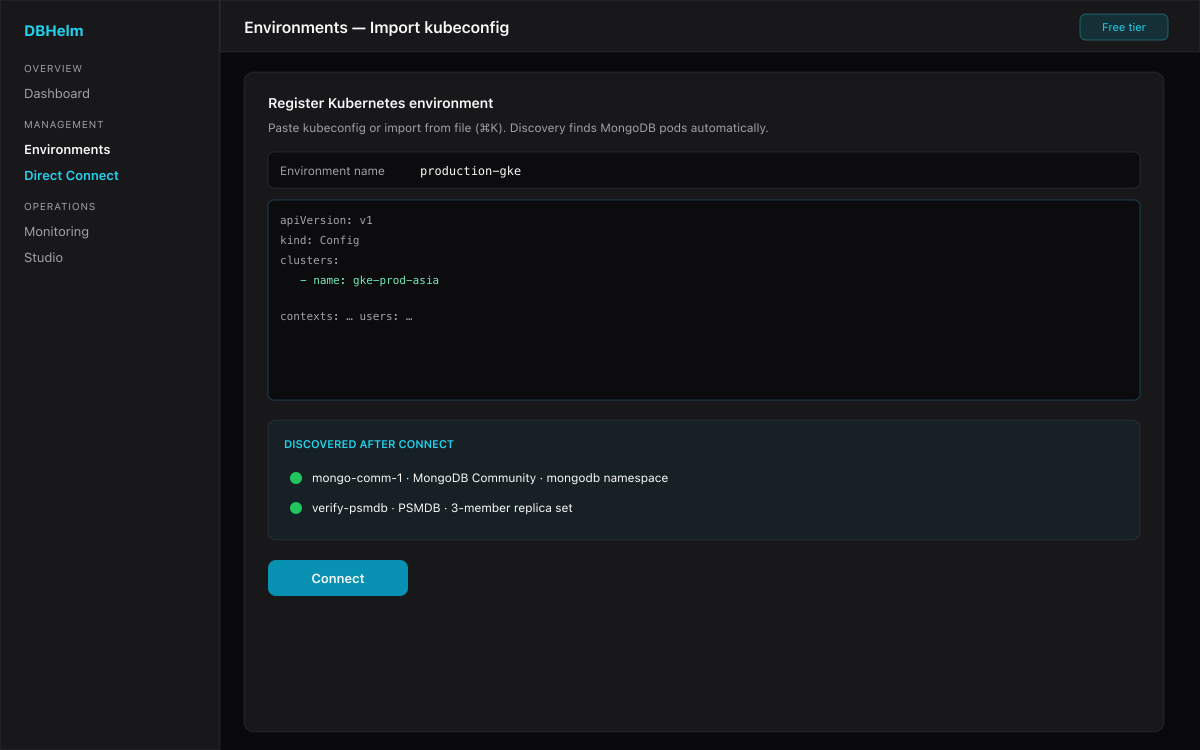
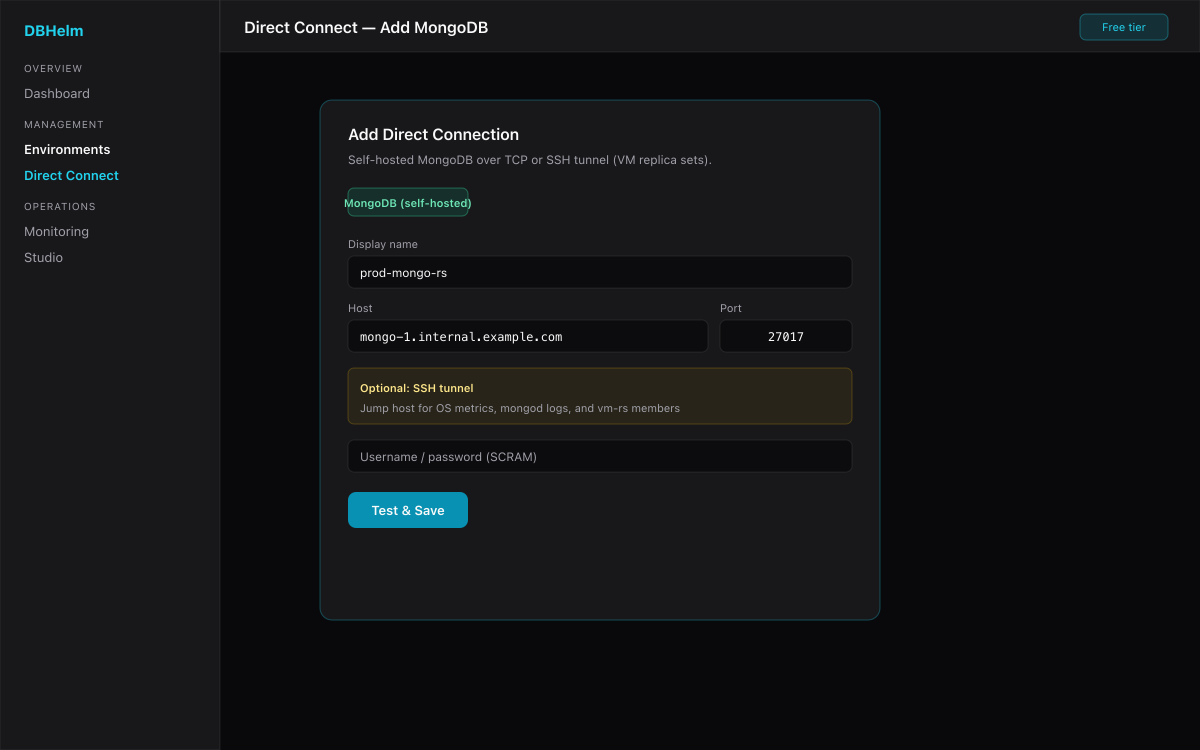
VM replica set & plain TCP — Direct Connect
For mongod on VMs or bare metal, add a Direct Connection with host/port (or replica-set URI). Optional SSH tunnel unlocks OS metrics and mongod log reads on vm-rs.
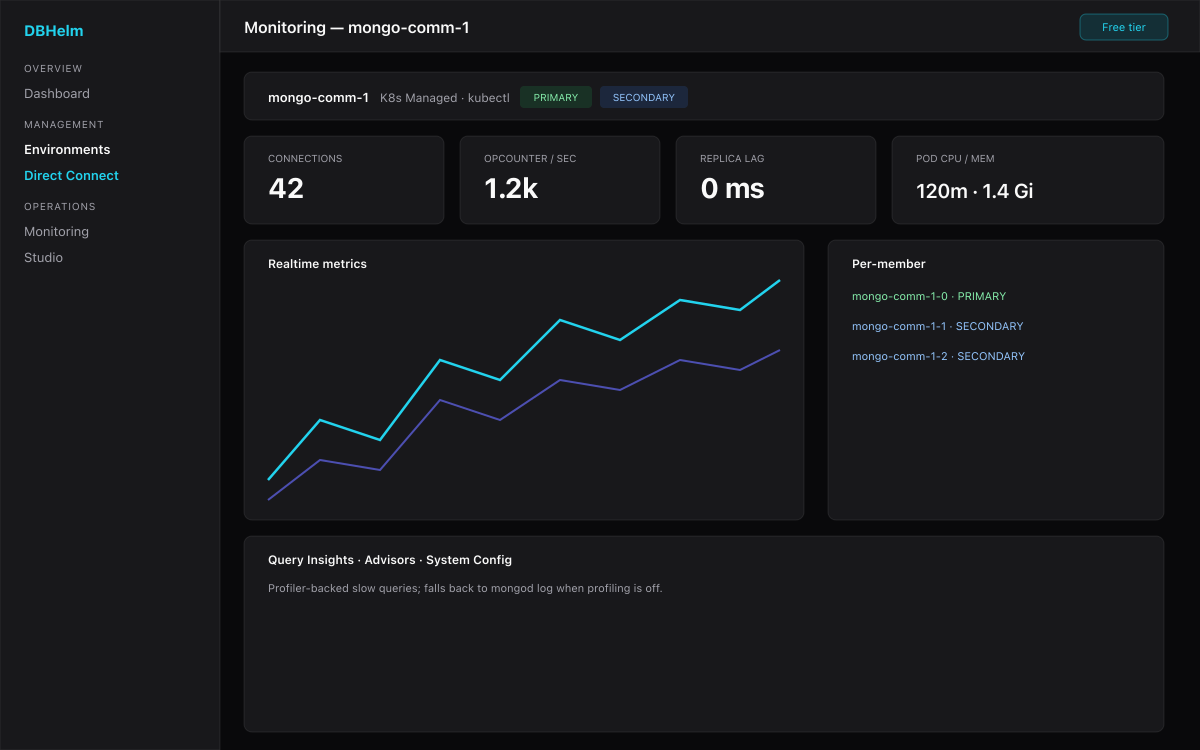
What you get on the free tier
Once connected, every MongoDB flavor gets the same module set on the free tier:
- Dashboards & realtime — serverStatus, replica-set status, collection stats, pod CPU/memory (K8s), and per-member realtime metrics.
- Query Insights — per-shape latency & scan ratios from the profiler (falls back to the mongod log when profiling is off).
- Advisors (6) — Query, Slow-log, Index Suggestions, Code, Performance, plus System Config (including OS-level recommendations). Pro.
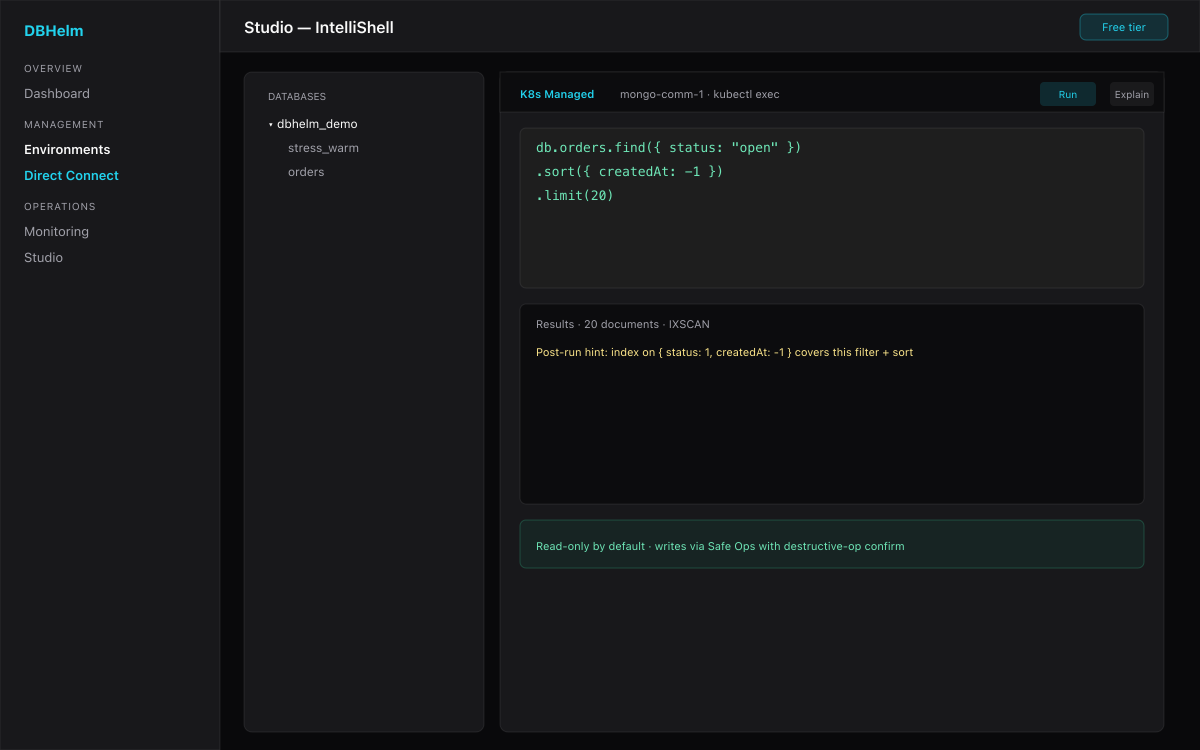
- Studio (IntelliShell) — read-only by default with post-run COLLSCAN hints; writes go through Safe Ops with a destructive-op confirm gate.
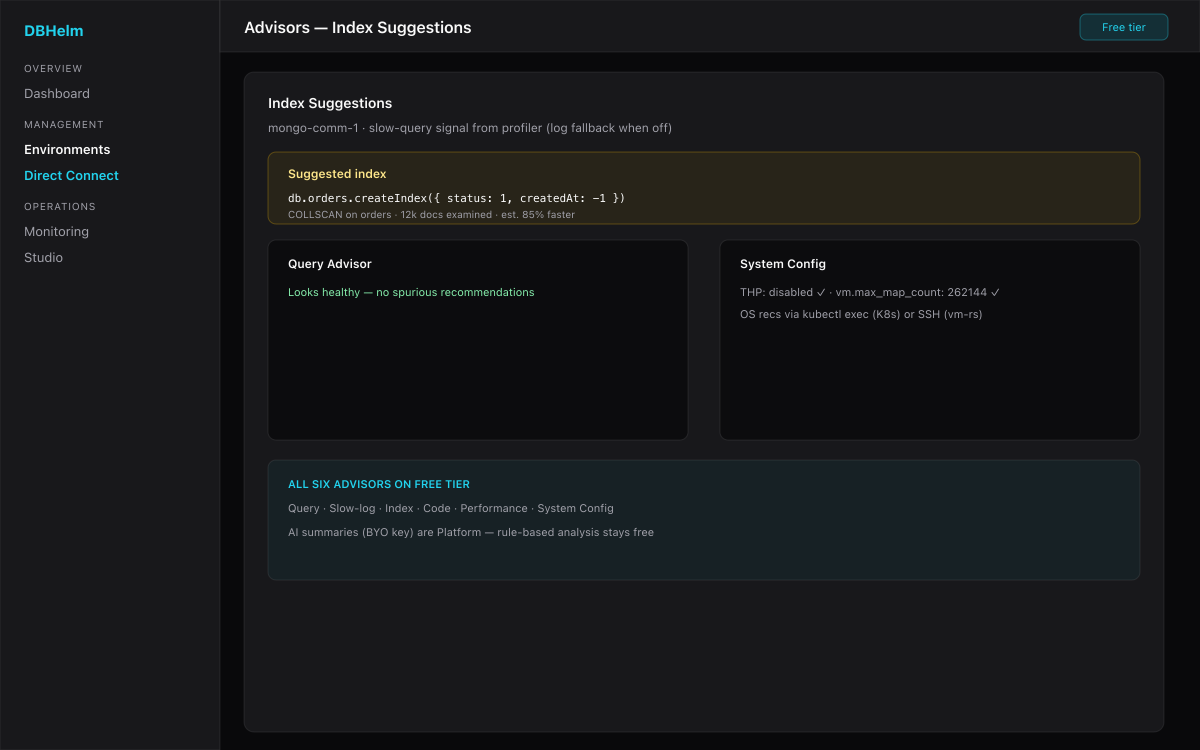
Known limitations & per-flavor notes
- Rich Query Insights need the profiler. Enable it for slow ops:
db.setProfilingLevel(1, { slowms: 100 }). Otherwise advisors fall back to the mongod log. - Index usage counts come from
$indexStats, which needs theclusterMonitorprivilege. Shared or locked-down deployments often don't grant it — suggestions still work, only the usage stat is blank. - OS-level recommendations. K8s flavors collect them via
kubectl exec(no SSH). VM replica sets need an SSH tunnel; managed Mongo DBaaS is out of GTM scope (self-hosted only). - Studio execute-mql is raw
mongoshon PSMDB; on other flavors it's a curated parser (find / aggregate / count / getIndexes / stats / runCommand …). Unsupported expressions return a clear error. DML is blocked everywhere — use Safe Ops for writes. - VM replica sets over a single SSH tunnel can collapse per-member metrics to the seed node; expose each member through its own reachable host for true per-member views.
Spinning up a new cluster
From DBHelm v1.8 onwards you can provision a new database in any registered environment — not just discover what's already there. The wizard lives at Environments → Spin up new cluster, and dispatches to one of 17 provisioners covering every DB-Engines top-10 engine. K8s providers (apply a CR to a registered Kubernetes cluster):
- PostgreSQL (CloudNativePG) —
postgresql.cnpg.io/Cluster - PostgreSQL (Percona PG Operator v2) —
pgv2.percona.com/PerconaPGClusterwith bundled pgBouncer + pgBackRest - MongoDB (Percona PSMDB) —
psmdb.percona.com/PerconaServerMongoDB - MongoDB Community (MongoDB Inc.) —
mongodbcommunity.mongodb.com - MySQL (Oracle MySQL Operator) —
mysql.oracle.com/InnoDBCluster - Redis (Spotahome Operator) —
databases.spotahome.com/RedisFailover - Apache Cassandra (K8ssandra) —
k8ssandra.io/K8ssandraCluster - SQL Server (StatefulSet) — operator-free, what Microsoft\'s docs now recommend
- Oracle Database (OraOperator) —
database.oracle.com/SingleInstanceDatabase - IBM Db2 (Db2u Operator) —
db2u.databases.ibm.com/Db2uCluster - Apache Kafka (Strimzi) —
kafka.strimzi.io/Kafka
Cloud-managed providers (call the cloud admin API with credentials from a Direct Connection):
- AWS RDS — Postgres + MySQL via CreateDBInstance
- Google Cloud SQL — Postgres + MySQL via the GCP Cloud SQL Admin API
- Azure Database for PostgreSQL + MySQL Flexible Server — via the Azure ARM REST API
Provisioned clusters appear under Clusters → Provisioned and are auto-discovered into the rest of the app (monitoring, backups, console) once they're ready.
MongoDB (Percona Server for MongoDB)
Prerequisite: the PSMDB operator must be installed. DBHelm installs it cluster-wide, so a single operator manages MongoDB clusters in any namespace. The standard install is one kubectl apply from the Percona docs, or one click from the Operator Hub.
The wizard collects: namespace, MongoDB version, replica-set size, CPU / memory limits per pod, PVC size per pod, and an optional sharded-cluster toggle. We submit the CR via the K8s API and the operator does the rest.
Endpoint: mongodb://<name>-rs0.<namespace>.svc.cluster.local:27017.
Day 2 (v1.17.1): on-demand backups via PerconaServerMongoDBBackup CRs (PBM under the hood, logical or physical), recurring schedules by patching .spec.backup.tasks[] on the parent CR, and in-place restore (with optional point-in-time target) via PerconaServerMongoDBRestore. Storage destination (S3 / GCS / Azure / filesystem) is configured on the parent cluster's .spec.backup.storages map at provision time.
MongoDB (Community — official MongoDB Inc. operator)
From v1.17.1 you can also provision via the upstream MongoDB Inc. Community Operator — useful when your stack requires Inc.-built binaries for compliance or support reasons. Most teams should still pick PSMDB above unless they have that hard requirement; PSMDB has more battle-tested tooling around backups and the wider Percona ecosystem.
Prerequisite: the MongoDB Community Operator must be installed (kubectl apply -f https://raw.githubusercontent.com/mongodb/mongodb-kubernetes-operator/v0.9.0/deploy/operator.yaml), or one click from the Operator Hub.
The wizard collects: namespace, MongoDB version (5.0 / 6.0 / 7.0), replica-set size, PVC size per member, optional storage class, CPU / memory limits, and an initial admin user. DBHelm generates a cryptographically random password (you can override), creates a Secret holding it, then submits the MongoDBCommunity CR. The operator handles SCRAM credential generation.
Endpoint: mongodb+srv://<name>-svc.<namespace>.svc.cluster.local/?replicaSet=<name>.
Backups note: the Community Operator doesn't ship a backup CRD upstream. Two paths: (a) use PSMDB instead, or (b) handle backups out-of-band (mongodump / your own Velero PVC snapshots). Object admin (databases / collections / users) works either way.
MySQL (Oracle MySQL Operator — InnoDB Cluster)
From v1.18.0 you can provision MySQL Group-Replication clusters via the official Oracle MySQL Operator. InnoDB Cluster gives you automatic failover, MySQL Router for read/write splitting, and operator-managed MySQLBackup CRs.
Prerequisite: the MySQL Operator must be installed (one click from the Operator Hub, or kubectl apply -f https://raw.githubusercontent.com/mysql/mysql-operator/trunk/deploy/deploy-operator.yaml).
The wizard collects: namespace, MySQL version (8.0 or 8.4 LTS), server replicas (1\u20139), MySQL Router replicas (1\u20135), per-pod storage size + class, CPU/memory requests, and the root username/host. DBHelm generates a cryptographically random root password (you can override), creates a Secret holding it, then submits the InnoDBCluster CR.
Endpoint: mysql://<name>.<namespace>.svc.cluster.local:3306 (MySQL Router routes writes to the primary, reads to replicas).
Day 2: on-demand backups via MySQLBackup CRs (logical dumps via MySQL Shell util.dumpInstance). Backup destination (S3 / OCI / persistent volume) is configured per-cluster via .spec.backupProfiles[] at provision time. Object admin (databases / users / roles) works via the standard mysql2 client \u2014 same UX as RDS / Cloud SQL / Azure DB MySQL.
Redis (Spotahome Redis Operator)
From v1.18.0 you can provision highly-available Redis on Kubernetes via the Spotahome Redis Operator (the most-deployed open-source Redis operator). The RedisFailover CRD provisions Redis pods + Sentinel pods for automatic failover.
Prerequisite: the Spotahome Redis Operator must be installed (one click from the Operator Hub, or apply the all-in-one manifest from spotahome/redis-operator).
The wizard collects: namespace, Redis version (6.2 / 7.2 / 7.4), Redis replicas (1\u20139; 3 recommended for HA + Sentinel quorum), Sentinel replicas (3\u20139, odd numbers only \u2014 quorum-required), per-pod storage size + class, CPU/memory requests, and an AOF-persistence toggle. When persistence is enabled we emit appendonly yes + appendfsync everysec in the customConfig.
Endpoint: redis-sentinel://rfs-<name>.<namespace>.svc.cluster.local:26379. Clients ask Sentinel which pod is the current master and connect there.
Backups note: the Spotahome operator doesn't ship a backup CRD. Two patterns: (a) PVC volume snapshots via your CSI driver (works for AOF + RDB), (b) BGSAVE-to-S3 sidecars. We'll add a wrapper for both in v1.18.x as customers ask.
Apache Cassandra (K8ssandra Operator)
From v1.19.0 you can provision Apache Cassandra via the DataStax-blessed K8ssandra Operator (k8ssandra.io/v1alpha1/K8ssandraCluster). Multi-datacenter from day one, optional Reaper repairs, and Medusa backups (planned for a follow-up release).
Prerequisite: the K8ssandra Operator must be installed (one click from the Operator Hub, or helm install k8ssandra-operator k8ssandra/k8ssandra-operator -n k8ssandra-operator --create-namespace).
The wizard collects: namespace, Cassandra version (4.0 / 4.1 / 5.0), datacenter name (defaults to dc1), nodes per datacenter (1\u201312), per-pod storage size + class, CPU/memory limits, and a Reaper auto-repairs toggle (on by default \u2014 strongly recommended for any non-trivial cluster).
Endpoint: cassandra://<name>-<dc>-service.<namespace>.svc.cluster.local:9042. Cassandra clusters take 5\u201315 minutes to bootstrap after CR submission \u2014 patience required.
Multi-DC note: v1 ships single-DC out of the box for simplicity. To add a second DC, edit the K8ssandraCluster CR's spec.cassandra.datacenters[] array \u2014 add another entry with a different name and the operator handles the rest. Wizard support for multi-DC arrives in a follow-up release.
Microsoft SQL Server (StatefulSet)
From v1.19.0 you can provision SQL Server on Kubernetes. Microsoft's original mssql-operator was deprecated; the StatefulSet path is what Microsoft's docs now recommend for vanilla SQL Server in K8s. No operator install needed.
The wizard collects: namespace, edition (Developer / Express / Standard / Enterprise \u2014 you bring your own license for the paid editions), version (2019 / 2022), storage size + class, CPU/memory requests + limits, and a mandatory EULA acceptance checkbox. We won\'t provision SQL Server until you tick the EULA box.
DBHelm provisions 4 K8s resources per cluster:
- An Opaque Secret with the SA password (cryptographically random by default; satisfies SQL\'s 8+ char / 3-of-4 character classes policy).
- A headless Service named
<name>-headless(for stable StatefulSet DNS). - A ClusterIP Service named
<name>(for client connections on port 1433). - The StatefulSet running the official
mcr.microsoft.com/mssql/serverimage with a TCP readiness probe.
Endpoint: mssql://<name>.<namespace>.svc.cluster.local:1433. Connect with SA + the password from the Secret.
v1 explicit limitations: replicas hard-coded to 1 (Always On Availability Groups out of scope for v1); PVCs preserved on remove() for data safety (delete manually for clean wipe); no operator-managed backup CRD ships with this approach \u2014 use Velero PVC snapshots, or wire up a sidecar that runs sqlcmd BACKUP DATABASE. Day-2 SQL Server admin (databases / users / roles) lands as a follow-up object-admin module.
PostgreSQL (CloudNativePG)
Prerequisite: the CNPG operator must be installed. One-shot:
kubectl apply -f \
  https://raw.githubusercontent.com/cloudnative-pg/cloudnative-pg/release-1.24/releases/cnpg-1.24.1.yaml
The wizard collects: namespace, Postgres major version (14, 15, 16), instances (1-5; 3 is recommended for HA), per-pod storage size, CPU / memory requests, and the initial database name + owner role. We build a single postgresql.cnpg.io/v1/Cluster CR and submit it.
CNPG creates three services automatically — <name>-rw (writes to the primary), -ro (reads from standbys), and -r (any replica). DBHelm uses the -rw service as the primary endpoint.
Operator Hub (one-click prereq install)
Most K8s provisioners need a database operator already installed. The Operator Hub at Environments → Operator Hub takes care of it: pick a registered cluster, see the install state of every operator we know about, and install with a button. We fetch the upstream YAML manifest, parse the multi-doc, rewrite namespaces if you choose a non-default one, and apply each resource via server-side apply with field manager dbhelm-installer.
Manifest URLs are pinned to DBHelm-tested versions:
- CNPG → release-1.24, v1.24.1
- PSMDB → percona-server-mongodb-operator v1.16.2
- Strimzi → latest stable from strimzi.io/install/latest (KRaft-only)
- Percona PG → percona-postgresql-operator v2.4.0
- MongoDB Community Operator → mongodb-kubernetes-operator v0.9.0
- MySQL Operator (Oracle) → mysql/mysql-operator trunk
- Redis Operator (Spotahome) → spotahome/redis-operator latest
- K8ssandra Operator → v1.20.0
The Create-Cluster wizard surfaces the same banner inline: pick a K8s env, and if the operator behind your chosen provisioner isn't there, you'll see a one-click install button right in step 2.
PostgreSQL (Percona Operator)
Sibling to CNPG. The Percona PG operator (v2) bundles pgBouncer connection pooling and pgBackRest backups out of the box — pick this one if you want both batteries-included.
Wizard fields: namespace, Postgres major version, instances, per-instance storage, optional storage class, pgBouncer replicas (set 0 to disable), backup retention in days. The wizard always emits one pgBackRest repo with a weekly Sunday-01:00-UTC full backup; tweak the CR after create for finer schedules.
Endpoint: postgresql://<name>-primary.<namespace>.svc.cluster.local:5432.
Apache Kafka (Strimzi)
Strimzi shipped KRaft-only since v0.40 — there's no ZooKeeper path. We model two node pools by default (controllers + brokers) so you get HA-ready topology immediately.
Wizard fields: namespace, Kafka version, controller pool size (1-5; 3 is canonical), broker pool size (1-9), per-broker storage, optional storage class, optional TLS listener.
We auto-cap offsets.topic.replication.factor and friends at min(brokers, 3) and set min.insync.replicas to 2 when you have ≥3 brokers (Kafka best practice).
Bootstrap endpoint: <name>-kafka-bootstrap.<namespace>.svc.cluster.local:9092 (PLAINTEXT) or :9093 (TLS, when enabled).
Cloud SQL (Postgres / MySQL)
Prerequisites:
- Cloud SQL Admin API enabled on the GCP project.
- A service account with
roles/cloudsql.admin(or finer-grained equivalents). - The service-account JSON registered as a Direct Connection (use the BigQuery type — same credential field).
The wizard collects: region, engine version (Postgres 14/15/16 or MySQL 5.7/8.0), machine tier (predefined or custom), storage in GB, auto-resize toggle, regional HA toggle, daily-backup + PITR toggle, and the root password.
Cloud SQL instance creation typically takes 5-10 minutes. The wizard returns immediately with the operation id; the cluster row stays in creating until the next poll sees state RUNNABLE. Endpoint: the primary IPv4 address + the engine's standard port.
AWS RDS (Postgres / MySQL)
Prerequisites:
- IAM user/role with
rds:CreateDBInstance,rds:DescribeDBInstances,rds:DeleteDBInstance. - A default VPC + subnet group must exist in the chosen region. RDS will pick the default subnet group automatically.
- Direct Connection of type "redshift" or "aws" with the AWS access keys. The same blob the Redshift adapter uses works here.
Wizard fields: region, engine version, instance class (db.t3.* / db.m6g.* / db.r6g.*), allocated storage (20-65,536 GB), Multi-AZ toggle, storage encryption, public-accessibility, master username + password, backup retention.
We always set StorageType=gp3, tag the instance with managed-by=dbhelm, and leave DeletionProtection=false on create — flip it from the AWS console once the instance is healthy.
Azure Database (Postgres / MySQL Flexible Server)
Prerequisites:
- Service principal with Contributor (or finer) on the target resource group.
Microsoft.DBforPostgreSQL/Microsoft.DBforMySQLresource provider registered on the subscription.- Direct Connection of type "azure" with a JSON blob containing
tenantId,clientId,clientSecret,subscriptionId, optionalresourceGroupdefault.
Wizard fields: resource group (must already exist), region (Azure calls it "location"), engine version, SKU (Burstable Standard_B* or General Purpose Standard_D*), storage in GB (32-16,384), zone-redundant HA toggle, admin username + password.
Azure password complexity is enforced client-side: at least 8 chars and at least 3 of these classes — uppercase, lowercase, digit, symbol. We enable public network access by default — lock it down via VNet rules in the portal once you're production-ready.
Auth uses the OAuth2 client-credentials flow against https://login.microsoftonline.com/<tenant>/oauth2/v2.0/token with scope https://management.azure.com/.default. Tokens are cached in-process for ~55 minutes.
Backups & DR — how it works
From v1.10 the provisioned-cluster detail page has a Backups tab. The backend dispatches backup actions to a BackupProvider registered against your cluster's provisioner key. The wizard auto-discovers compatible backup adapters via GET /api/clusters/:id/backups/catalog, so adding a new adapter on the backend lights up new buttons in the UI without a frontend change.
Lifecycle states: pending → running → completed / failed (or deleting → deleted). Use the refresh button on a row to re-poll upstream and reconcile the row.
CNPG Backup
Submits a postgresql.cnpg.io/v1/Backup CR pointing at your existing Cluster. Two methods supported:
- barmanObjectStore — full backup to whatever S3 / GCS / Azure target you wired into
.spec.backupon the parent Cluster. - volumeSnapshot — CSI VolumeSnapshot. Requires your storage class to be backed by a CSI driver that supports snapshots.
Scheduled / recurring backups are configured on the Cluster CR itself, not here. This adapter is for ad-hoc, name-it-yourself backups.
PSMDB Backup
Submits a psmdb.percona.com/v1/PerconaServerMongoDBBackup CR against your PSMDB cluster. PITR uses the operator oplog tracker when enabled on the parent cluster spec.
Use the Backups tab on a provisioned PSMDB cluster for on-demand backups; schedules live under the cluster's backup tasks when configured at provision time.
MySQL Operator backup
Uses the Oracle MySQL Operator backup path (mysql.oracle.com backup CR) for logical dumps via util.dumpInstance into the object store configured on the InnoDB Cluster.
Percona PG (pgBackRest)
Submits a pgv2.percona.com/v2/PerconaPGBackup CR. The cluster CR's .spec.backups.pgbackrest.repos[] tells the operator where to write — local PVC, S3, GCS, or Azure.
Three backup types: full, differential, incremental — mapped to --type=full, --type=diff, --type=incr respectively.
AWS RDS snapshot
Calls the RDS Admin API CreateDBSnapshot. Returns immediately with the snapshot identifier as externalId. Subsequent refreshes poll DescribeDBSnapshots until status available.
RDS daily automated backups are separate — those are configured on the parent instance at provision time. This is for ad-hoc point-in-time snapshots you name yourself.
The same adapter handles both aws-rds-postgres and aws-rds-mysql clusters.
Strimzi MirrorMaker2 (Kafka DR)
Kafka doesn't really have a "snapshot" model — DR is done via continuous async replication. The MM2 adapter submits a kafka.strimzi.io/v1beta2/KafkaMirrorMaker2 CR that mirrors topics + consumer-group offsets from a remote source cluster into the cluster you provisioned.
Wizard fields: source alias + bootstrap (the cluster you're mirroring from), target alias (defaults to target), topics regex, consumer-groups regex, replication factor, MM2 Connect worker replicas.
We use IdentityReplicationPolicy by default so topics on the target carry the same names as on the source — easier failover semantics. Topic ACL sync is off; turn it on via the CR if you want it.
Note: in the Backups tab, MM2 rows stay in running indefinitely — that's correct, MM2 is "ongoing" rather than "completable".
Create database / role / schema
Provisioning a cluster gives you an empty Postgres engine. v1.10 adds an Objects tab on the cluster detail page where you can create:
- Databases — CREATE DATABASE with optional owner, encoding, template.
- Roles — CREATE ROLE with LOGIN / SUPERUSER / CREATEDB / CREATEROLE flags, optional password.
- Schemas — CREATE SCHEMA inside a chosen database, optional AUTHORIZATION.
Supported clusters: k8s-cnpg, k8s-percona-pg, aws-rds-postgres, gcp-cloudsql-postgres. Credential resolution is per-provisioner:
- CNPG — reads the operator-generated
<cluster>-appSecret in the same namespace. - Percona PG — reads
<cluster>-pguser-<cluster>Secret. - RDS / Cloud SQL — uses the master password we stored in
provisioned_clusters.configat provision time, connecting over TLS to the resolved endpoint.
DDL safety
Every CREATE / DROP statement is built with helper functions (quoteIdent, quoteLiteral, assertSafeIdentifier) — never via template-string interpolation. Names are restricted to ^[A-Za-z_][A-Za-z0-9_$]{0,62}$ regardless of what Postgres would technically accept inside double quotes — keeps RBAC, audit-log grep, and connection-string roundtrips simple.
Passwords for new roles must be ≥8 characters and are escaped via single-quote doubling. We never persist them in our SQLite DB.
DROP statements always use IF EXISTS so re-running cleanup is idempotent. The Objects tab only shows a Drop button on rows DBHelm itself created — observed-only objects are read-only from the UI.
Restore
From v1.11 the Backups tab on each cluster has an upload-arrow icon next to completed backups. Click it to restore the backup into a brand-new cluster — DBHelm submits the upstream restore call and creates a new provisioned_clusters row that the rest of the app picks up automatically.
CNPG. We submit a new postgresql.cnpg.io/v1/Cluster CR with spec.bootstrap.recovery.backup.name pointing at the source backup, plus an externalClusters[] entry naming the source cluster so the operator can pull WAL during PITR. Wizard collects only the new instance count; image, storage, and other settings are inherited from the source.
AWS RDS. We call RestoreDBInstanceFromDBSnapshot. Wizard collects new instance class, Multi-AZ, and public-accessibility flags. Engine + version are inherited from the snapshot.
Lifecycle. The new row starts in creating and the existing provisioner-poll loop drives it to ready. The restored cluster gets its own Backups + Schedules + Objects tabs, just like a freshly-provisioned one.
Backup schedules
The Schedules tab on each cluster lets you wire recurring backups. Three adapters ship in v1.11:
- CNPG ScheduledBackup — submits a
postgresql.cnpg.io/v1/ScheduledBackupCR. Multiple cadences allowed per cluster (e.g. hourly incrementals + nightly fulls). Cron is the K8s/Quartz 6-field variant or the standard 5-field POSIX form.backupOwnerReference: selfmeans deleting the schedule cleans up the Backups it created. - Percona PG schedule — patches the parent
PerconaPGClusterCR's.spec.backups.pgbackrest.schedules.<type>. One schedule per (repo, type) triple — defining the same combination twice overwrites the previous cron. - RDS backup window — calls
ModifyDBInstancewithPreferredBackupWindow+BackupRetentionPeriod. RDS only supports one window per instance; the wizard enforces this withmultipleAllowed: false. The "cron" field is actually an AWS time-window string like07:00-08:00(UTC, ≥30 minutes wide).
Strimzi clusters don't have a backup-schedule concept — Kafka DR uses MirrorMaker2 (covered above) which is itself an ongoing process.
MongoDB objects
The Objects tab on a PSMDB cluster supports three kinds:
- Database — Mongo creates DB storage on first write, so we materialize the new database by adding a placeholder collection (default name
_dbhelm_init; safe to drop later). - User —
db.createUseron the chosen auth database with one of the built-in roles (read,readWrite,dbOwner,dbAdmin,clusterMonitor,root). - Collection —
db.createCollection. Optional capped + size for capped collections.
Credential resolution: PSMDB operator creates a Secret named <cluster>-secrets; we read MONGODB_USER_ADMIN_USER + MONGODB_USER_ADMIN_PASSWORD and connect over the <cluster>-rs0 headless service.
MySQL objects
RDS MySQL and Cloud SQL MySQL clusters get an Objects tab with two kinds:
- Database —
CREATE DATABASEwith optional charset / collation.utf8mb4is the default. - User —
CREATE USER … IDENTIFIED BY …with an optionalGRANT(ALL / CRUD / SELECT) on a chosen database. Host filter defaults to'%'.
Identifier escaping uses backticks with embedded-backtick doubling; literals use single-quote doubling. We set SET sql_mode = 'NO_BACKSLASH_ESCAPES' on each connection so our literal escaper is the only escape behavior in play.
Kafka topics
Strimzi clusters get an Objects tab with one kind: topic. We submit a kafka.strimzi.io/v1beta2/KafkaTopic CR labeled strimzi.io/cluster=<parent>; the Strimzi Topic Operator reconciles it into an actual broker topic.
Wizard collects partitions (1-1024), replicas (1-9; must be ≤ broker count), cleanup.policy (delete / compact / both), and retention.ms (default 7 days; -1 = infinite, only valid with compact). Topic names follow Kafka rules: [A-Za-z0-9._-], ≤ 249 chars.
Snowflake objects
Through a Snowflake Direct Connection, the Objects tab can create WAREHOUSE / DATABASE / SCHEMA / ROLE / USER via DDL. Identifier safety uses the same quoting helpers as Postgres objects. See also the Snowflake adapter notes for auth and monitoring.
Databricks objects
Unity Catalog CATALOG + SCHEMA via DDL, plus SQL Warehouse lifecycle via REST when credentials allow. Requires a Databricks Direct Connection with PAT + warehouse HTTP path. See the Databricks adapter.
Spot-check CLI
End-to-end integration smoke-test that walks every provisioner through validate → loadContext → create → poll → delete against your real creds. Lives at scripts/spot-check.ts.
cp scripts/spot-check.config.example.json spot-check.config.json
# fill in your creds (kubeconfig, GCP / AWS / Azure principals)

# dry-run: validate + loadContext only, no upstream calls
npm run spot-check

# full lifecycle: actually create + delete each cluster
npm run spot-check:create
Each case prints a per-stage pass/fail line plus a final summary. Designed to run in CI against a sandbox account — exit code is non-zero on any failure.
AI assistant
From v1.12 the Console has an "Ask AI to write a query" panel above the editor. You type a natural-language question, the LLM proposes a query, and DBHelm classifies the proposal before you can run it. This is the only AI assistant we know of that is fused with the existing destructive-op classifier + (for SaaS engines) cost dry-run + read-only-mode gate.
Tagline: "AI that won't drop your prod table."
Bring your own key. No LLM cost on us. Configure a provider in Settings → AI assistant:
- OpenAI — gpt-4o-mini (default, cheap), gpt-4o, gpt-4.1-mini, o4-mini.
- Anthropic — claude-3-5-haiku (default, cheap), 3-5-sonnet, 3-7-sonnet.
- Ollama — local, free, zero cost. Pull a model first:
ollama pull llama3.1. Default base URLhttp://localhost:11434. - Disabled (default) — no AI panel rendered, no key stored.
Safety pipeline. The backend's classifyAndGate() runs every LLM proposal through the same path a hand-typed query takes:
- Empty / whitespace proposal → blocked with reason "the model declined".
detectDestructiveOpsagainst the engine's dialect — destructive (DROP / DELETE / TRUNCATE / FLUSHALL / dropDatabase / etc.) → confirm required; mutating (INSERT / UPDATE / SET) → confirm required.- Read-only mode on + write detected → blocked outright with the exact ops listed.
- SaaS engine + cluster bound → dry-run for cost preview. Estimated > $1 or > 1 TiB scanned → confirm required and warning surfaced.
Defense in depth. The system prompt also tells the model to refuse writes in read-only mode. Both layers must fail for an unsafe query to land — and even then, the user still has to click "Use this query" + the existing destructive-confirm modal in the editor.
Privacy. The prompt and completion text are never persisted. Only token counts + classification go to the audit log.
Plugin SDK
v1.12 ships @dbhelm/sdk: a TypeScript-typed surface for community-built provisioners, backup adapters, schedule adapters, object admins, and SaaS providers. Drop a single .mjs file into ~/.dbhelm/plugins/ and the new tile shows up in the Create Cluster wizard (or wherever your registration lands).
Five extension points matching DBHelm's internal registries:
registerProvisioner— new "spin up a cluster" target → Create Cluster wizard tileregisterBackupProvider— new "take a backup" adapter → Backups tabregisterScheduleProvider— new scheduled-backup adapter → Schedules tabregisterObjectAdmin— new "create database / role / topic" adapter → Objects tabregisterSaasProvider— new managed-cloud database engine → Console + Monitoring
Plugins are loaded at backend boot. Failures are isolated — a misbehaving plugin logs and is skipped, it cannot crash the backend. They cannot reach into Drizzle, bypass auth, replace built-in providers, or read another plugin's encrypted secrets.
See packages/sdk/README.md + examples/hello-mariadb-provisioner.mjs in the repo for a complete walk-through.
GitOps event log
Every state-changing event (cluster create / delete, backup create / delete / restore, schedule create / delete, object create / delete, operator install, direct-connection create / delete) is mirrored into ~/.dbhelm/state/state-history.jsonl in addition to the regular audit log. The audit log keeps non-state events too (logins, views, etc.); the GitOps log is curated to only the things you'd want to roll back, replay, or git-blame.
Optional Git mirroring. Set DBHELM_STATE_GIT_REPO=/path/to/repo before launch and DBHelm will git add + git commit each event into that repo. git log becomes your full state history. Pair with git push in a post-commit hook for distributed history.
Replay (v1.14.1). Open the GitOps log page in the sidebar. Every state-changing event is rendered as a vertical timeline with action glyphs. Click "Replay to here" on any event — DBHelm reconstructs the full StateFile that would have produced the system at that moment and copies the YAML to your clipboard. Paste into Declarative and apply. Effectively: time-travel for your database estate.
Drift detection (v1.14.1). A background job runs every 15 minutes (env DBHELM_DRIFT_INTERVAL_MS; set to 0 to disable). It compares the live state with either (a) the latest replay of state-history.jsonl (default) or (b) a desired YAML at DBHELM_STATE_DESIRED_FILE. Severity is bucketed: none / minor (only unmanaged resources) / major (any create/update/delete needed). The GitOps log page surfaces a banner at the top with the current report.
Cross-engine federation
From v1.13 the sidebar has a Federation page. Pick which Direct Connections to attach (Postgres + MySQL families today), give each an alias, then write ANSI SQL across them — joins push down to DuckDB scanners when they can, otherwise materialize.
How it works. The backend keeps a single in-process DuckDB instance with the postgres_scanner and mysql_scanner extensions pre-loaded. Clicking "Attach" runs ATTACH '<dsn>' AS <alias> (TYPE POSTGRES, READ_ONLY) using your Direct Connection's credentials, decrypted at attach time. After that the alias appears as a virtual catalog: SELECT * FROM pg_app.public.users JOIN my_orders.orders ON … just works.
Eligible engines (v1.13). All Postgres flavors (CNPG, RDS, Cloud SQL, Azure DB, Cockroach, Citus, Timescale, Yugabyte). All MySQL flavors (RDS, Cloud SQL, Azure DB, MariaDB, PXC, Vitess). Mongo / Redis / Snowflake / BigQuery don't have first-party DuckDB scanners; they remain in their own console for now (we'll add them in v1.16+ via materialization).
Safety. Attaches default to READ_ONLY. Result rows are capped at 1000 unless you specify your own LIMIT. The credential blob is decrypted at attach time and held in DuckDB's process memory; we never log the DSN (the audit log redacts password fields).
Limits. One DuckDB instance per backend process means concurrent users share state. v1 is intended for single-user / small-team use; multi-user federation isolation lands in the Enterprise self-hosted control plane.
Declarative state ("Terraform for DBs")
From v1.14, DBHelm has a fourth pillar (after provisioning, day-2, and federation): a single YAML file that describes your entire database estate. dbhelm plan state.yaml shows the diff against current state; dbhelm apply state.yaml executes it. Re-runs are idempotent. The same file works from the UI's Declarative page or from a CI pipeline.
Schema (apiVersion: dbhelm.com/v1). Three top-level sections — clusters, objects, schedules — that map 1:1 to the registries the rest of the app uses.
apiVersion: dbhelm.com/v1
kind: StateFile
metadata:
  name: prod
clusters:
  - id: prod-pg
    provider: k8s-cnpg
    envId: kc-1                  # K8s cluster id (k8s-* providers) or
                                 # Direct Connection id (cloud providers)
    namespace: default
    config:
      pgVersion: "16"
      instances: 3
      storageSize: 100Gi
      databaseName: app
objects:
  - cluster: prod-pg
    kind: database               # database / role / schema / topic
    name: orders
    config:
      owner: app
      encoding: UTF8
  - cluster: prod-pg
    kind: role
    name: readonly
    config:
      login: true
      password: "<set-at-apply-time>"
schedules:
  - cluster: prod-pg
    provider: cnpg-backup-schedule
    name: nightly
    cron: "0 2 * * *"
    config:
      method: barmanObjectStore
Plan output uses Terraform-style symbols: + create, ~ update, - delete, = unchanged, ? unmanaged (exists in DB, not in your file). For each ~ the diff is rendered key-by-key.
Apply walks plan items in dependency order (clusters first, then objects + schedules whose parent cluster succeeded). Failures don't abort — each item gets an ok/failed/skipped status in the result. Apply is non-destructive by default.
Export dumps the current managed state (everything DBHelm provisioned, everything you created via the Objects + Schedules tabs) into a YAML you can commit. Secrets are stripped — passwords are blank slots you fill at apply time.
Dispatch. Apply uses the exact same provisioner / object-admin / schedule-provider registries the UI uses. So everything the wizard can do, the YAML can do — and vice versa. The audit log records each action with source: 'declarative' in details so you can grep for what came from a YAML apply vs. a UI click.
CLI.
npm run dbhelm -- validate state.yaml     # parse + check, no plan
npm run dbhelm -- plan     state.yaml     # diff vs. current
npm run dbhelm -- apply    state.yaml     # execute
npm run dbhelm -- export > state.yaml      # starter file from current state
Cost intelligence (full-fleet as of v1.25)
DBHelm estimates the monthly + annual spend of every database in your fleet — provisioned by DBHelm, K8s-discovered, AND Direct Connect — using a built-in rate card. No extra cloud credentials required. As of v1.26 you can also drill into per-table cost attribution (70% storage + 30% compute weighted) for any Postgres connection: pick a database + the monthly $ figure from the breakdown, and the top 50 tables get ranked by allocated $ per month. The storage tier ladder at /api/schema-doctor/storage-tier recommends gp2 → gp3 (AWS RDS, ~20% cheaper at same size), io1 → gp3 when IOPS demand is low (~30-50% cheaper), and pd-ssd → pd-balanced for typical Cloud SQL OLTP workloads (~30% cheaper). The catch: estimates ignore reservations, savings plans, sustained-use discounts, free tiers, network egress, and per-query SaaS spend. For matching-the-penny figures, wire up the live billing puller (post-v1.27 roadmap).
What you get today. Headline tiles (monthly / annual / coverage / top opportunity), per-engine bar chart, per-provider rollup, ranked per-cluster ledger sorted high\u2192low. Each cluster card has a one-line explanation of the math: "db.r6g.large: $0.226/hr × 1 replica × 730 hrs/mo + 100 GB storage = $176.48/mo".
How estimation works.
- AWS RDS — instance class lookup. 14 classes covered (t4g, m6g, r6g families). Storage at $0.115/GB-mo (gp3).
- Cloud SQL — tier lookup (6 named tiers) or, when you specify vCPU + RAM, the custom-shape formula at $0.0413/vCPU-hr + $0.007/GB-RAM/hr. Storage at $0.17/GB-mo (SSD).
- Azure DB — Flexible Server SKU lookup (8 SKUs). Storage at $0.115/GB-mo.
- K8s-hosted (CNPG / PSMDB / Strimzi / Percona PG) — per-replica default at $0.05/replica/hr (~m5.large equivalent share) + $0.10/GB-month for storage. We don't probe the underlying node, so this is intentionally an "approximate" — connect a billing puller for exact.
- SaaS (BigQuery / Snowflake / Redshift / Databricks) — per-query model. Cost shown as $0 here with a pointer to query history (where the dry-run cost preview already lives, since v1.6.14).
- Unknown instance class — surfaced explicitly so you can add it to
backend/src/services/cost/rateCards.tsvia PR (pure data, no logic changes).
Storage parsing. K8s-style suffixes work natively: 100Gi, 100GB, 1TiB all parse correctly. Deleted/failed clusters cost zero.
Migration engine
From v1.17, DBHelm can move a database from MySQL to Postgres in three clicks. It's the third Tier 2 moat — competitive with paid migration tools that cost $10k+/year. The first source/target pair shipped is MySQL \u2192 Postgres; Mongo \u2192 Postgres and DynamoDB \u2192 Postgres are next on the v1.17.1+ roadmap.
Workflow.
- Source picker — any MySQL-family Direct Connection (MySQL / MariaDB / RDS MySQL / Cloud SQL MySQL / Azure MySQL).
- Target picker — any Postgres-family Direct Connection (Postgres / RDS Postgres / Cloud SQL Postgres / Azure Postgres / Cockroach / Citus / Timescale / Yugabyte).
- Plan — DBHelm walks
information_schemaand renders a per-table card with: source\u2192target column mapping (lossy mappings flagged with an amber pill), generated CREATE TABLE + CREATE INDEX DDL (inspectable), warning aggregation, total estimated rows. - Execute — choose schema-only (DDL run, no data moved) or full. Data streams in pages of 1,000 (configurable 100\u201310,000) via parameterized multi-row INSERTs. Per-table error isolation \u2014 one failing table doesn't kill the whole run. After each table copies, source vs target row counts are compared and the result surfaced inline.
Type mapping highlights. tinyint(1) \u2192 BOOLEAN (the de-facto MySQL bool). Unsigned ints widen one tier (smallint\u2192integer, int\u2192bigint, bigint\u2192numeric(20,0)+lossy flag). AUTO_INCREMENT PKs become SERIAL/BIGSERIAL. JSON\u2192JSONB. ENUM/SET\u2192TEXT (lossy). MEDIUMINT/MEDIUMTEXT/LONGTEXT collapse to INTEGER/TEXT. Geometry types\u2192BYTEA. TIMESTAMP\u2192TIMESTAMPTZ. YEAR\u2192SMALLINT. Unknown types fall back to TEXT with a "please verify" note.
v1 explicit limitations (called out in the UI):
- Defaults stripped (different SQL between engines — re-apply after migration).
- Foreign keys not migrated yet (re-add manually).
- BLOBs become BYTEA, geometry types become BYTEA, ENUM/SET become TEXT.
- No dual-write cutover yet \u2014 lands in v1.17.1.
Every execute is captured in the audit log + GitOps event log with source/target connection ids, table count, total rows copied, and duration.
Query Optimizer
From v1.23, DBHelm has a query optimizer that takes a query you paste, gathers live schema + index + size context from the connected database, runs a safe read-only EXPLAIN, and asks your configured AI provider to rewrite it. The original query is never executed — only EXPLAIN runs.
Workflow. Pick a connected database \u2192 paste a query \u2192 click Optimize. The result panel shows: optimized query (side-by-side with the original), plain-English explanation, index suggestions with the exact CREATE INDEX DDL + tradeoff note (write cost / storage), warnings, EXPLAIN-cost comparison, and the destructive-op classification of the rewrite.
Engine-aware best-practice hints baked into the prompt for 14 dialects. Examples: Postgres \u2192 LATERAL joins / partial + BRIN indexes / EXISTS-vs-IN / keyset pagination over OFFSET. MongoDB \u2192 ESR rule for compound indexes / $in on leading field only / projection-only covered queries / cursor pagination. Cassandra \u2192 ALLOW FILTERING red flag + denormalize-at-write. Snowflake \u2192 clustering keys + result cache + column pruning. Full list lives in queryPromptBuilder.ts.
Safety. The optimizer hard-refuses multi-statement queries (defense against ; SET ; DROP TABLE patterns), transaction control + DDL grants, and nested EXPLAIN ANALYZE. Schema introspection only reads planner stats from information_schema / pg_class / collStats \u2014 never your row data. Connection access is org-scoped (matches v1.22 /api/migrate model). Hard cap: 50K char query, max 20 tables analyzed per call. Powered by your configured AI provider \u2014 see Settings \u2192 AI.
Code Optimizer
From v1.23, paste application code and DBHelm flags performance / safety / security / maintainability issues, then returns a rewritten version. Supports 12 languages: TypeScript / JavaScript / Python / Java / Go / Ruby / C# / PHP / Rust / Kotlin / Scala / SQL.
What it looks for. N+1 query patterns. Missing pagination on unbounded result sets. String-concatenated SQL (injection risk). Sync DB calls in async paths. Missing connection pooling. ORM over-fetching. Per-row INSERT in loops where batch APIs exist. Engine-specific anti-patterns when you link to a connected DB (Postgres \u2192 missing parameterization / connection leaks; MongoDB \u2192 N+1 from looping .findOne(); Cassandra \u2192 sync drivers; etc.).
Result panel. Categorized issue list (4 categories \u00d7 4 severity levels: critical / high / medium / low) sorted by severity. Rewritten code with optional unified-diff view. Recommendations per issue. Estimated overall impact.
Privacy + safety. Before your code reaches the AI provider, DBHelm runs redactCredsFromCode() which replaces 8 categories of credential patterns with [REDACTED]: password / pwd / passwd / secret / token / apiKey / privateKey assignments; URL-embedded creds (postgres://user:pass@host); Bearer tokens in headers; OpenAI sk- keys; AWS AKIA* + ASIA* access keys; PEM private key blocks. The redaction count is surfaced in the response so you know what was sanitized. Hard cap: 60K char code per call.
Index Janitor
Pro Optimize tool: finds unused / duplicate / low-usage / missing-FK indexes and emits DROP INDEX CONCURRENTLY (Postgres) or equivalent DDL for MySQL. Read-only — copy DDL into Console to apply. Mongo index hygiene lives under Advisor on Free/Pro paths as documented in the changelog.
Schema Doctor
Pro Optimize tool: missing primary keys, missing FK indexes, high-NULL columns, oversized text, never-ANALYZEd tables. Generates ALTER / CREATE INDEX suggestions; never auto-executes.
Autovacuum Pressure Map
Postgres-specific Pro tool: bloat, stale stats, never-vacuumed relations, wraparound risk, and high-write-rate tuning hints from catalog stats.
Pool Fit
Samples pg_stat_activity and returns a Fit Score 0–100 plus a recommended pool size (typically 2–3× peak active). Pro Optimize suite.
Plan Watch
Register hot queries; DBHelm re-EXPLAINs on a schedule and alerts on plan-shape changes or ≥2× cost jumps. Fingerprints + history timeline. Pro Optimize suite — never runs the user query itself.
First launch & first account
On first launch DBHelm creates a SQLite database in your OS app-support dir and prompts you to register the bootstrap super-admin. There's no canned default account — pick any email (work or personal) and a password ≥ 12 chars containing uppercase, lowercase, and a digit. Subsequent users are added by a super-admin from Settings → Users.
The local SQLite DB lives at ~/Library/Application Support/DBHelm/dbhapp.sqlite3 (macOS) — encrypted at the field level for credentials, but back the file up like any other secret store.
Optional email-domain allowlist: set ALLOWED_EMAIL_DOMAINS=acme.com,acme-internal.io (comma-separated) before launching the backend if you want to restrict who can register. Empty / unset = anyone with a valid email format.
Import a kubeconfig
Use DBHelm → Import Kubeconfig… (⌘K) and point at any local file. DBHelm parses each context, exec-plugins included, and renders them as separate environments. Token-based exec plugins (aws eks get-token, gcloud config config-helper) are auto-renewed in the background.
Direct Connections (no K8s)
If your databases live on bare metal, EC2, RDS, Neon, Supabase, etc., add them as Direct Connections under Databases → New Direct Connection. DBHelm stores the connection string in encrypted form locally and never proxies your traffic through any external service.
BigQuery adapter
Register a GCP service-account JSON as a Direct Connection of type BigQuery. Console runs dry-run cost estimates before execute; monitoring uses INFORMATION_SCHEMA job and storage views. Same credential shape is reused for Cloud SQL Admin API provisioning.
Snowflake adapter (beta)
DBHelm supports two auth modes:
- Username + password (sufficient for ad-hoc use)
- Username + key-pair (recommended for production; paste the PEM private key directly)
The dry-run cost banner uses EXPLAIN, so it shows estimated bytes scanned but not credit consumption. Monitoring uses SNOWFLAKE.ACCOUNT_USAGE.QUERY_HISTORY, WAREHOUSE_METERING_HISTORY, and STORAGE_USAGE — your role needs USAGE on those views.
Beta: this adapter has been validated against multiple accounts, but please report any anomalies — especially around credit math.
Redshift adapter (beta)
Auth uses the standard AWS chain: an explicit access-key/secret pair, a Secrets Manager ARN, or instance/profile credentials when running on EC2. The query path uses the Redshift Data API (no VPC tunnels needed). Monitoring blends CloudWatch (CPU, connections, queries/s) with sys_query_history for top-N slow queries.
Databricks adapter (beta)
Configure with workspace URL + HTTP path + a personal-access token. DBHelm uses the SQL warehouse you choose; ensure it's running before the first query (or accept the warm-up delay). Monitoring uses system.billing.usage and system.query.history, both of which require Unity Catalog.
Destructive-query detection
Every query goes through a per-engine classifier before it runs. We tag the query as destructive (DROP, TRUNCATE, DELETE, ALTER, GRANT, FLUSHALL, dropDatabase, …) or mutating (INSERT, UPDATE, SET, etc.). Destructive ops require a confirm-dialog. Read-only mode blocks both classes outright. The classifier strips comments and string literals first, so INSERT INTO logs VALUES ('DROP TABLE x') is correctly flagged as mutating-but-not-destructive. The implementation is unit-tested — see backend/src/lib/destructiveOps.ts.
Read-only mode
Per Direct Connection or Kubernetes environment you can force read-only: mutating and destructive statements are rejected before they reach the engine. Useful for shared prod viewers and demos. Combine with local RBAC (super-admin / admin / read-only users) for defense in depth.
Team audit webhook signatures
On a Pro team, the Super Admin sets one audit webhook on the Team page, and every member's DBHelm sends its audit events there: sign-ins, team changes and every query, reads included. Saving the webhook creates a signing secret (whsec_…) that only Super Admins can see or rotate.
Each delivery is a JSON POST with the header X-DBHelm-Signature: t=<unix seconds>,v1=<hex>. v1 is HMAC-SHA256 of t + "." + raw request body, keyed with the secret. Verify against the raw bytes before parsing, compare in constant time, and reject timestamps more than 5 minutes old. Events that waited in a laptop's outbox are signed again when they are finally sent, so the timestamp is always the send time.
import { createHmac, timingSafeEqual } from 'node:crypto';

function verify(secret, rawBody, header, now = Math.floor(Date.now() / 1000)) {
  const parts = Object.fromEntries(header.split(',').map((p) => p.split('=')));
  const t = Number(parts.t);
  if (!Number.isInteger(t) || Math.abs(now - t) > 300) return false;
  const expected = createHmac('sha256', secret).update(`${t}.${rawBody}`).digest();
  const given = Buffer.from(parts.v1 || '', 'hex');
  return given.length === expected.length && timingSafeEqual(given, expected);
}
After a rotation, laptops that have not checked in yet keep signing with the old secret until their next check-in (at most 6 hours, or at sign-in), so accept both for a short overlap if you rotate during working hours. Every member's laptop holds the secret in order to sign, which proves an event came from your team's DBHelm, not which member's laptop sent it; the userEmail and device fields say that. Slack and Teams incoming webhooks ignore the header.
Telemetry (opt-in only)
Telemetry is off by default. To enable error reporting, set both DBHELM_TELEMETRY=1 and a Sentry DSN (SENTRY_DSN=…) in the environment. We forward error messages and stack traces only — never query text, results, connection strings, or credentials. beforeSend scrubs request bodies, cookies, and authorization headers.
CLI & REST API
The desktop binary embeds an Express backend on localhost. Hit http://127.0.0.1:<port>/api/health after launch for a sanity check. Declarative fleet ops use the in-app state YAML flow (plan / apply / export) and optional Git remote — a standalone scriptable CLI remains on the roadmap; track the changelog.